Settings
Open Options from the gear icon in the title bar. The window keeps its changes as a draft until Apply or OK; Cancel discards them and Default restores the built-in values.
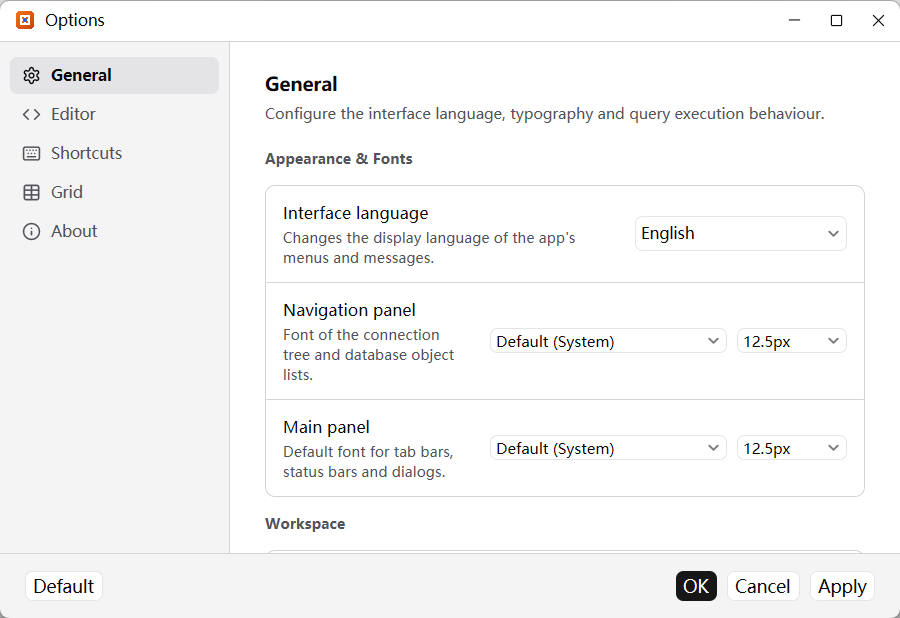
General
- Interface language switches the menus and messages immediately.
- Navigation panel and Main panel set the font family and size of the tree, tabs, status bars and dialogs.
- Restore on startup reopens the previous query tabs, connections, databases and table tabs.
- Single-click mode opens connections and objects with one click; leave it off for double-click, like Navicat.
- Keep the object search preserves each list's search text when switching tabs, databases or connections.
- Statement limit per run caps a multi-statement script (0 means no limit), and Stop on error stops it at the first failed statement.
Editor
- Font family and size, with a live preview.
- Show line numbers and Word wrap take effect in every open query editor, not only new ones.
- Ctrl + mouse wheel zooms the editor while reading; the setting itself does not change.
Grid
- Data grid font controls cells in table pages and query results.
- Show field comments and Show field types add a small second or third line under the column name. Both are off by default because they use header height.
- Save changes when leaving a row applies the Navicat record model:
EnterandTabonly stage cells, and the row is written when you leave it withUp/Downor a click. Turn it off if you prefer to collect edits and pressCtrl+Syourself.
Shortcuts
Search commands by name, click a command to record a new key combination, and use the reset action to restore its defaults. The search box filters across every group.
About
Shows the current version, checks GitHub for a newer release and displays that release's changelog. The site's own news is separate from the app version.
Settings and shortcut bindings are stored in settings.json; passwords are never written there. This site follows the browser language on a first visit — English by default, Chinese for a Chinese browser — and remembers a manual choice from the language menu.