Sync
Sync compares a source database with a target database and writes only the differences you approve.
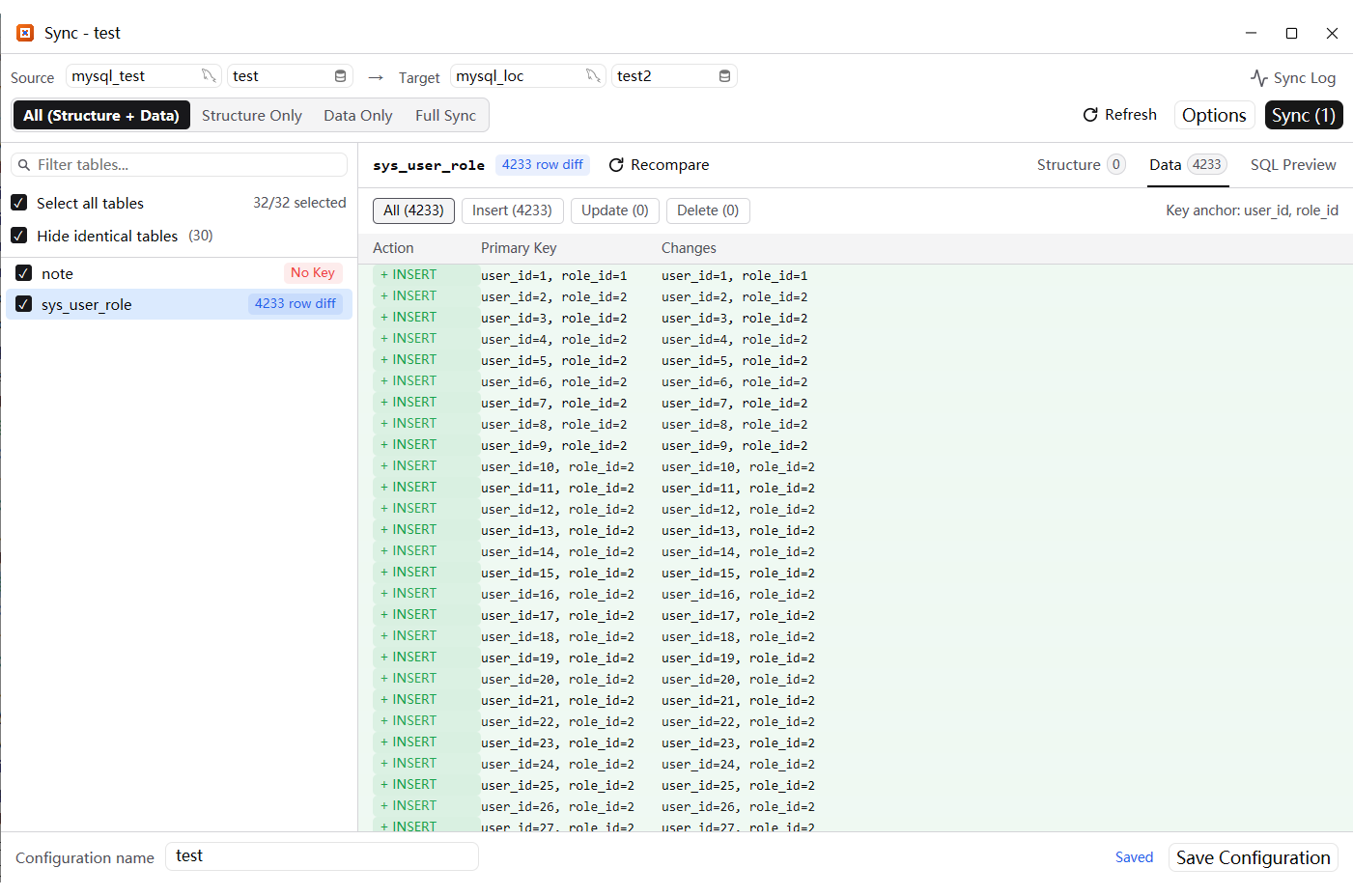
Set up the comparison
- Pick the source and target connection and database at the top. The arrow points from source to target.
- Choose a mode: All (Structure + Data), Structure Only, Data Only or Full Sync.
- The table list shows every table and its difference count. Use the filter box, Select all tables, and Hide identical tables to focus on what changed.
Review the differences
- Select a table to see Structure, Data and SQL Preview.
- Structure shows the column/index differences. Data shows Insert, Update and Delete groups with the primary key and the changed values; a table without a key is marked No key.
- Recompare refreshes that table after either side changes. Sync Log records what the run does.
- The action chips filter the row list: all rows, inserts, updates or deletes.
Run the sync
- Sync applies the selected mode to the target. Review the SQL preview first when the target contains production data.
- The configuration name at the bottom can be saved and reopened later, like a backup configuration.
- A table without a primary key has no reliable row identity; sync warns instead of guessing, so add a key before syncing such tables.
Good practice
- Run the comparison against a copy first, or take a backup of the target.
- Structure changes may drop or alter columns; read the SQL preview before confirming.
- Use Data Only for routine refreshes and All when the target is being brought up to date from scratch.